My Account name: password:
»» Login Reminder
The PHP Encoder for Solaris Sun The PHP Encoder for Apple Mac The PHP Encoder for FreeBSD The PHP Encoder for OpenBSD The PHP Encoder for NetBSD The PHP Encoder for Linux Unix The PHP Encoder for Windows The PHP Encoder for:
Buy Now!
Click to buy the ultimate PHP Encoder


Free Demo

Try a Free demo now. We'll be happy to support you


How it works

The SourceGuardian™ for PHP Encoder protects PHP scripts by compiling PHP source code into a binary bytecode format and this is then supplemented by encryption and encryption layer.  We also use obfuscation within our process at various points. No changes can be made in protected scripts to add an additional security level and any change to an encoded file will make it unusable.

An example of an encoded file will look like this:

<?php @SourceGuardian; 723223512; 2120562490; //v7.0
sg_load('AAQAAAAMAAAABNgAAACABAAAAAAAAAD/
p855bSuUrcnpAoHDubYJ1V+1PWHjTSJP0nyKT0KaH
3IT4uU06T/1bLxWcAh8ouahzUV+jHbkWNKk+6vCFq
R9W7PR7hKNTvn0fnXnjAAxnnI1wv9R880NxdLUEkr
L+Gl7OW9T2XkP/uXS6QuSfUQObOtXjUOUkbsyFdbL
CCr1ucfdyR1JbJ/Pefrlb9eXDhiiru25ygekotkDS
VIJE/4byL46iw4jA6SGIdDlxrQoyfAZP9AHnzno0v
qtKr31KVkn2wdtcOiLg8e8lcitXQkO993gSqwWLH5
oL6N9yZwRONsq0uOtkT3BKIuqD7qz0Z8Pa041mQgm
KGSDGYezAxx21spKm+sTFaWXuqyu7JfxpbO0a8PWa
Ln+ytsToE2a+ljm7IoadmlxDVjknIn5aHZ96tnq2b
s48RUozKNfu72A6yw=');

?>

We have written below a basic example walkthrough of how the SourceGuardian PHP Encoder works, but we would strongly recommend that you download our demo, roll your sleeves up and give us a try.

You may also download the PHP Encoder user manual from here

These are basic steps you will need to do to protect you PHP code with SourceGuardian™ for PHP Encoder.

1. You write your PHP scripts. Sure, you already have your PHP project you need to protect. Your project may consist of many files possibly including each other or may includes only one file. It does not matter you can protect it anyway. So your file may look like this:

<?php
echo “Hello World!”;
?>


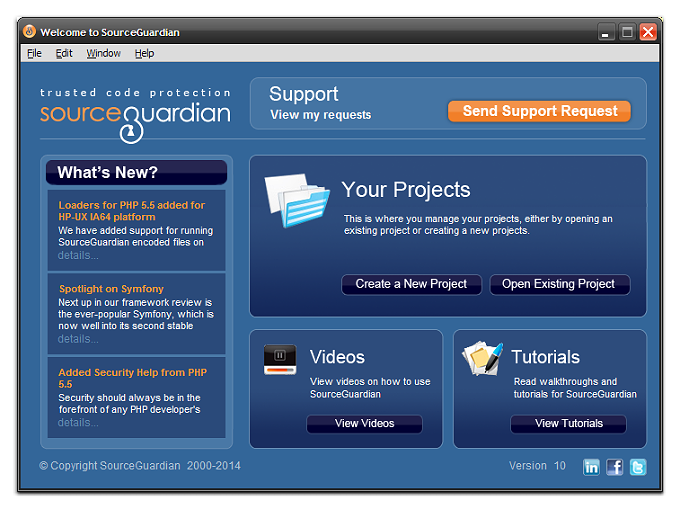
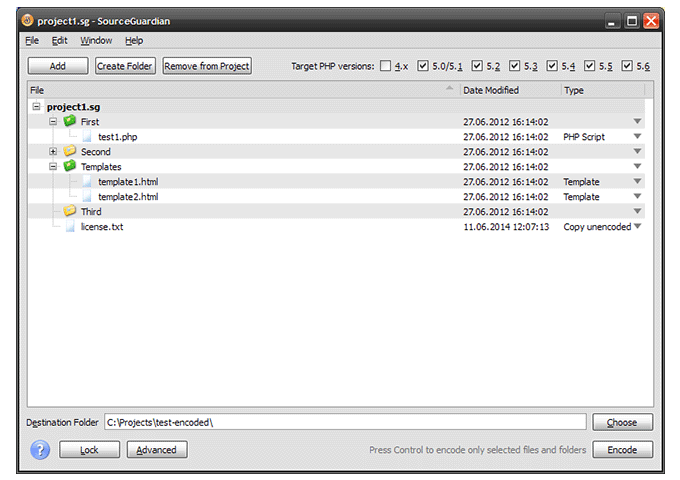
2. You run SourceGuardian Encoder, create new project, add your PHP project folder or separate files into it, choose destination directory where encoded files will be written.

If you use Windows this will look like this:


If you use Macintosh this will look like this:


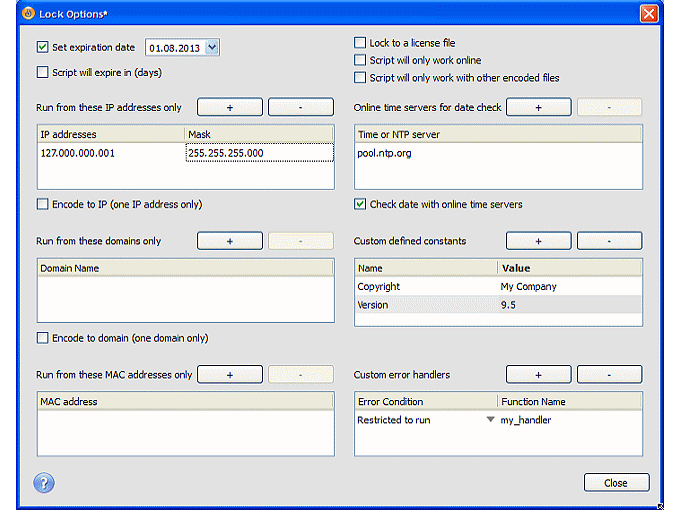
3. You set PHP mode, locking options and advanced options for your protected scripts. You need to choose if your protected PHP code will run under PHP4 or PHP5 engine. Adding locks to your protected files is optional but useful if you need to create a trial version of your code or if you need to allow your code to work only on one or some domains, machines etc. You may add following locks to your protected scripts with SourceGuardian Encoder. Read here about all available options.

• Set expiration date
• Lock to IP addresses
• Lock to domain names with wildcards
• Lock to hardware MAC addresses
• Restrict protected scripts to work with unencoded scripts
• Lock to external license file which will be required to run protected scripts
• Set custom constants which will be written into encoded script and will be available from the protected code

If you use Windows this will look like this:


If you use Macintosh this will look like this:


If your locked script will be run on another machine, domain, IP etc, when the expiry date passed, i.e. when any of the locking conditions are violated the script cannot run and the error message will appear like this:

SourceGuardian Loader - script cannot run on this machine [01]
SourceGuardian Loader - script license is invalid [06]
SourceGuardian Loader - script has expired [09]
etc

You may find detailed description of possible error messages in our user manual in “Locking options” section. Also it’s possible to add your own error handlers for locking errors.

Using locking to external license is very useful when you need to deploy your protected scripts to many customers. You may encode your scripts once with locking to an external license file. Pass protected scripts to your customers or let them download it. Scripts will not work until the correct license file is installed for them. You can generate license files separately from encoding process or even program this to happen automatically on your server. Pass license file individually for each customer to let them run your code. You may generate different licenses with different locking options for each customer. You may update the code separately, create updates etc without breaking the licenses.

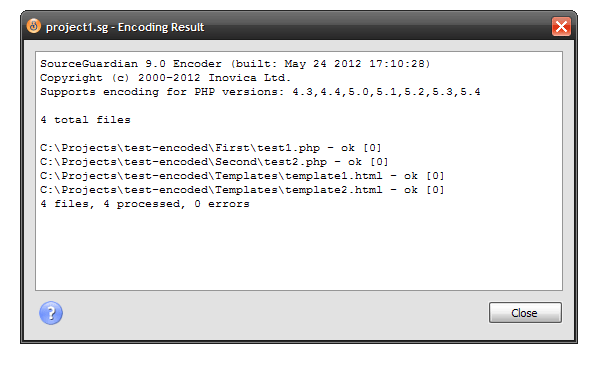
4. You click “Encode” to run encoding for your files. Progress window will be shown displaying all encoded files.

If you use Windows this will look like this:


If you use Macintosh this will look like this:


5. Install the loader for your system to run protected scripts. SourceGuardian protected scripts requires the loader to be installed to run protected scripts. Loader is required because source code is encoded with bytecode binary protection. The loader does decrypting of the bytecode and running it. Source code is never restored (this is not possible) even within the loader. Loader is dynamic loaded library (shared object), which is actually PHP extension. Loaders are free. Using the loaders does not require any license to be installed. You may freely distribute loaders to your customers, include them within your protected software etc.

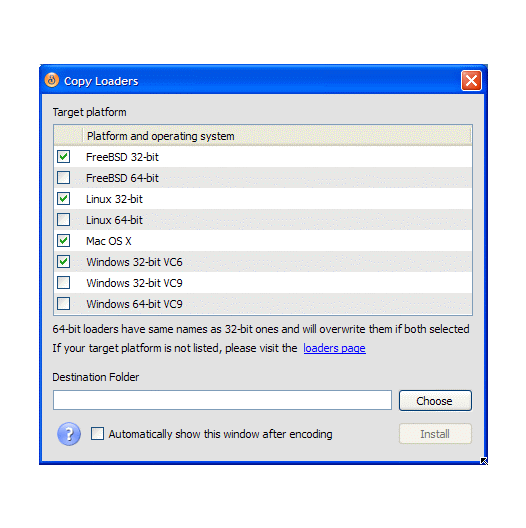
SourceGuardian Encoder GUI will install loaders for selected OS into /ixed/ subdirectory within your selected target directory. Is it the same on windows? Click “Install” to copy the loaders.

If you use Windows this will look like this:


If you use Macintosh this will look like this:


We have multiple loaders as they differ for different OS, CPU, PHP version and PHP thread safety option. Your SourceGuardian Encoder installation includes all loaders for all supported OS and PHP versions. Currently we have loaders for Linux, FreeBSD, Mac OSX, Windows, OpenBSD, Sun Solaris and HPUX. All versions of PHP are supported since version 4.3. We update loaders to support new versions of PHP when they are available on Official PHP site. Latest loaders are available from our site

There are two ways the loader may be installed:

• Dynamic loading. This is simple method and it’s usually possible on most server configurations. SourceGuardian Encoder GUI will create a folder “ixed” within your destination folder and will copy the needful loaders there. It will be all loaders required for selected PHP version (PHP5 or PHP4) for selected OSes. So you may install protected files on different machines without a need for installing separate loaders.

Dynamic loading is possible if:
1) dl() function is not disabled in php.ini, i.e. enable_dl=Off
2) PHP is not is Safe Mode, as Safe Mode restricts to load any extensions dynamically
3) PHP is not compiled with Thread Safety. Thread Safety is usually enabled on Windows when PHP is installed as module. Also Thread Safety may be enabled on other multithreaded webservers optionally.
4) extension_dir should point to existing directory on server. This is required as PHP can load extensions only relatively to extension_dir. Note, it is NOT required your scripts directory on server to be relative to extension_dir.
5) open_basedir setting is off or allows access to extenstion_dir and loaders directory

It is possible to check all the above settings in phpinfo() output run on your target server.

• Server-wide install. This method works in all configurations but requires access to php.ini PHP configuration file. This is the only method to install the loader on windows if PHP is loaded as module (most configurations). Also this method should be used when dynamic loading is not permitted for any reasons. If you don’t know how to change php.ini or have no access to do it you may contact your service provider about it. Our loaders are safe, fully compatible with other PHP extensions and other software and do not affect unprotected code execution. So SourceGuardian loader will not affect other users if installed on a shared hosting server.

Installing the loader in php.ini will speed up protected scripts execution because the protected script will not need to search for the loader. The loader will be loaded once on PHP start.

To install the loader in php.ini you need to copy the loader file into extension_dir and add the following directive into php.ini:

extension=ixed.X.Y.Zdd.os

eg. extension=ixed.5.2.lin
or extension=ixed.5.1.win
or extension=ixed.4.4.dar
etc.

You need to restart your webserver to make changes live. Please read “Loader filename structure” section under “Protected scripts loaders” in our user manual to learn about loader names. You need to install the loader which will run on your OS with your version of PHP.

It’s important that Evaluation and Full version loaders are different and have different file names. All evaluation loaders have “ev” in file name. You need to use evaluation loaders to run scripts encoded with our demo version. Use full loaders later for scripts encoded with full version. This is only important for server-wide install as you need to copy the loader and specify the file name in PHP config. It does not matter for dynamic loading as SourceGuardian Encoder will copy the required loaders for you.

6. Encoding is done. The specified target directory contains a directory tree with all files you added for encoding. Also the target directory will contain /ixed/ subdirectory with SourceGuardian loaders for selected operating systems.

You need now to move the target directory content to your webserver space.
You may save your SourceGuardian project file. This will save all links to source files and folders, all options you set. Next time you need to encode your files (when you update your sources) you can open the saved SourceGuardian project file and just click “Encode”.

It’s important to save your SourceGuardian project when locking to external license file is used. The project file includes keys generated for your project. These keys are required for license files generation.

7. It’s done! Run your protected script now.

If you get an error message like this:

PHP script … is protected by SourceGuardian and requires the SourceGuardian loader … The SourceGuardian loader has not been installed, or is not installed correctly. Please visit the SourceGuardian php encoder site to download required loader.

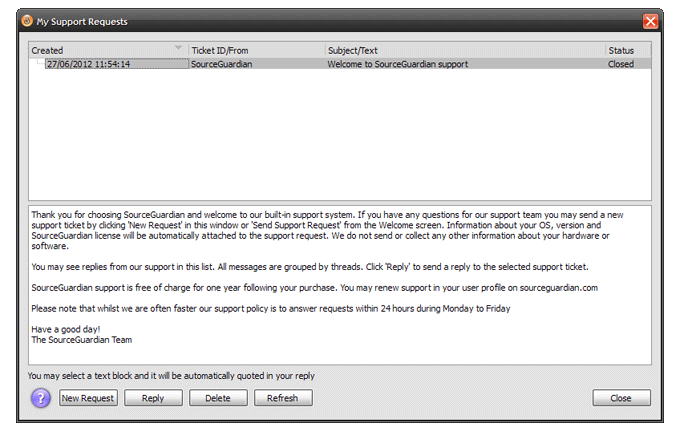
Please check if you have installed the loader. If you use dynamic loading please check if it is allowed (read the previous section about it). If you are still having problems with running protected scripts or have any other questions about using SourceGuardian Encoder feel free to contact us in support. Send email to support@sourceguardian.com and we reply you soon. We reply to support in 24 hours.
email:
PDF Brochure - 2Mb
Home l Free Demo l How it works l PHP Encoder features l Partners l FAQs l Support l Case Studies l Buy Now l Testimonials l Sitemap
© Copyright 2002- SourceGuardian.com l Terms & Conditions l Privacy Policy